AI in simple terms: what is an MCP server?
Hi Guys, in the last article I described what an agent harness is, and I promised we would build one next. Then a friend told me MCPs are dead and agents just use CLI commands now. I didn't want to argue — so I wrote this instead…
Hi Guys, In the last article I described what an agent harness is, and I promised we would create our own harness in the next one. But just last week I was talking with a friend of mine and he happened to tell me MCPs are dead — agents use CLI commands now. I didn’t want to argue with him, but I thought of writing about it so I can just point him at my blog ;)
So, what is MCP? MCP stands for Model Context Protocol. It’s pretty similar to any protocol you already know — HTTP, RPC and so on. It helps AI agents access and use the tools they need to respond to user prompts or complete agentic workflows.
And that’s exactly where the argument for CLI commands comes from. Instead of an agent connecting to MCP servers and spending tokens discovering and understanding the available tools, what if the agent already knows the available CLI commands and can just execute them directly?
It’s rarely that simple. Maintaining CLI commands securely, especially when they touch sensitive infrastructure or databases, is a massive security risk. When an agent uses a CLI, the question quickly becomes: who holds the keys, and what stops the agent from doing something catastrophic?
Maintaining CLI access for an autonomous agent is basically handing over the keys to your entire infrastructure and crossing your fingers.
To understand why, let’s break down the diagram below. It shows the fundamental difference between the CLI approaches and MCP — where the credential sits, and what actually enforces your read-only rule.
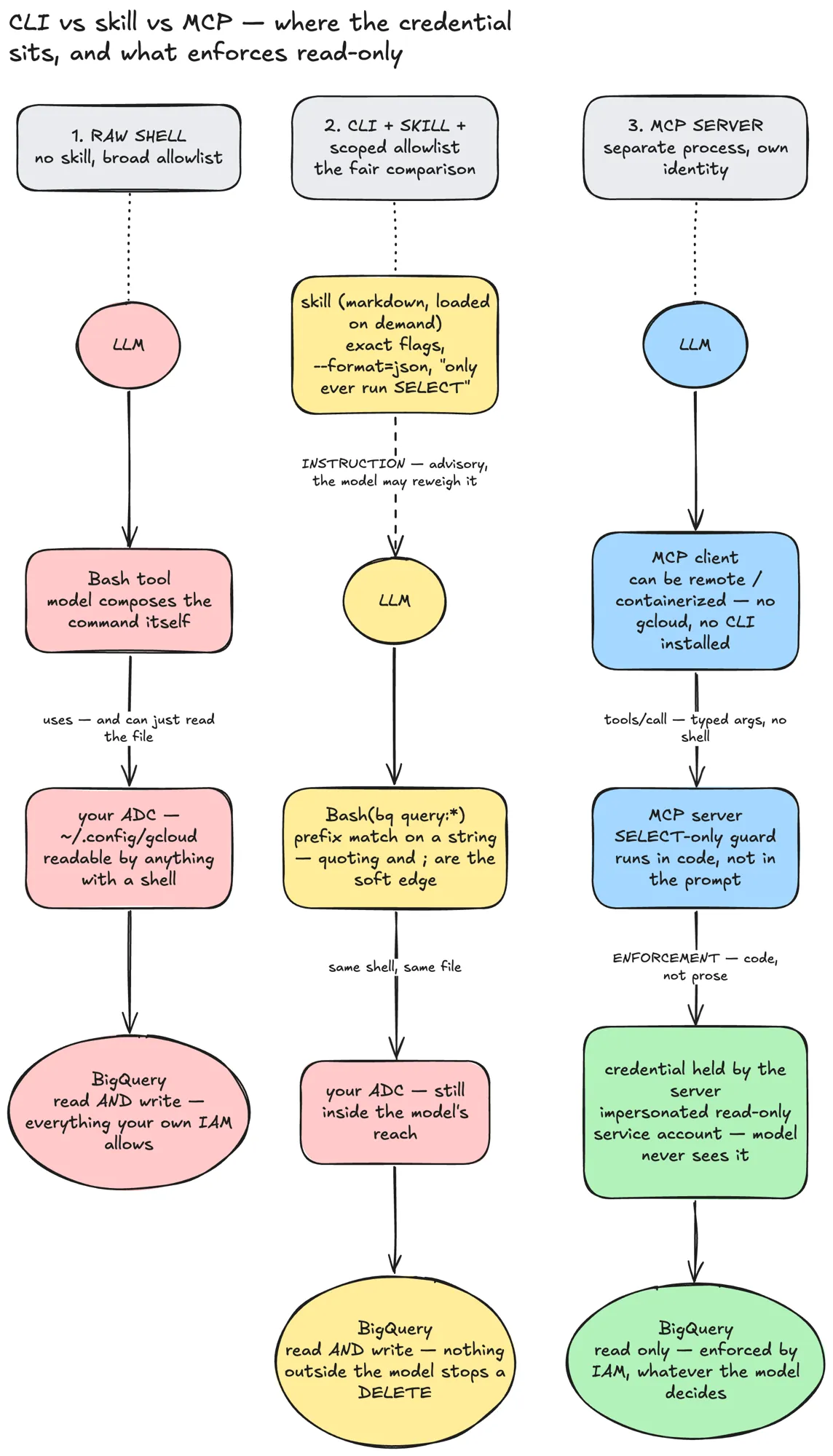
Same task, three architectures — only the third one has a hard edge
1. The raw shell (the wild west)
In the first column we have the naive approach: give the LLM a raw bash tool and let it compose the commands itself. Sure, it’s fast. But the agent operates using your environment’s Application Default Credentials (ADC) — that ~/.config/gcloud file sitting on your machine. If your user account has BigQuery read and write access, the LLM has it too.
There is absolutely zero isolation. One hallucination, and your agent could happily execute a drop table.
2. CLI + skills (the illusion of safety)
Your friend might argue, “just tell the agent to only run SELECT queries!” That’s the middle column. You give the model a scoped allowlist through a markdown prompt — a skill — telling it to only use specific flags and to format output as JSON. You might even try to enforce it with a prefix match on the bash command, something like allowing only commands starting with bq query:.
The fatal flaw? This is security by prose. Instructions to an LLM are advisory; the model can reweigh them at any time. The quoting and parsing validations are soft edges — a stray ; or a bit of creative quoting walks straight through a prefix match. And because the agent is still running in the same shell, reaching the same ADC file, there is no hard boundary stopping it from bypassing your prompt and deleting data.
Look at the middle column of the diagram again. The skill is a dashed line — an instruction. The credential at the bottom is exactly the same credential as column one.
3. The MCP server (a real architectural boundary)
This brings us to the third column, and to why MCP is the better choice for production systems. Instead of treating tools as a loose collection of shell scripts, MCP treats them like proper microservices.
Process isolation. The MCP server runs as a separate process with its own identity. The MCP client can be completely containerized, with no CLI installed at all.
Typed arguments instead of a shell. The LLM doesn’t string together raw bash. It sends cleanly typed arguments in a tools/call. There is no shell to exploit.
Code, not prose. The guardrails — only allowing SELECT, for example — are written in actual code on the server, not pleaded for in a system prompt. Enforcement is absolute.
Credential segregation. The credentials are held by the server, usually an impersonated read-only service account. The model never even sees them. Even if the LLM goes completely rogue, IAM acts as an unbreakable hard edge.
So why does this feel obvious?
Because it is. When we build backend systems, we don’t let client-side applications execute shell commands against our databases. We build APIs with strict IAM roles, validation and isolated credentials. MCP is simply bringing those same battle-tested engineering standards to AI agents.
None of this means CLIs are useless — for your own laptop, on your own repo, a bash tool is genuinely faster and cheaper than a tool listing. But “it works on my machine with my credentials” has never been an architecture, and it doesn’t become one because an LLM is the one typing.
So no, MCP isn’t dead. It’s the only way I know to build agent tools you can actually trust in a real environment.
In the next article we will finally get hands-on and build out that agent harness I promised. Stay tuned! :) Happy Vibe Coding !!!
Ask the archive
Got a question about this or anything else here? Ask, and get the passage that answers it — from all 97 posts, in your browser.